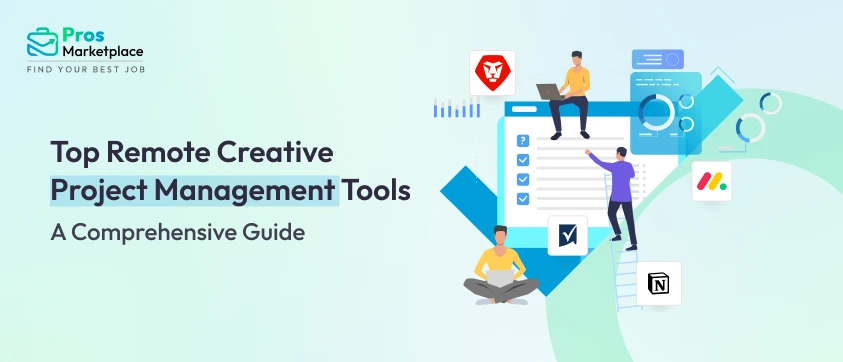
Managing creative projects is quite challenging! Unlike regular projects, creative workflows tend to be more fluid and collaborative, requiring design, marketing, and content tools that cater to specific professionals. Unlike regular traditional projects, which are typically a step-by-step process, creative project management softwares are designed for flexibility and monotonous processes. This approach is more suitable for the ever-changing nature of creative work. This is equally important whether you’re in a creative agency, a technical sector, or in an in-house team.
In the year 2025, the need for specialized tools that enhance the productivity of creative teams has reached new heights. Such teams require more than just regular task management software. They need a system that can handle real-time collaboration, intense brainstorming sessions, asset management, and visualization. Most creative projects require collaborating with multiple departments. These tools enable collaboration among different departments and help to align and optimize workflows across many sectors. Moreover, tools that integrate with design applications such as Adobe Creative Cloud or Figma are crucial for productivity and workflow efficiency.
Understanding Remote Creative Project Management System: Meaning & Benefits
Tracking progress, enhancing collaboration, and allocating resources become easier with the right tools, especially for sophisticated projects. Having the right management solutions can increase the effectiveness of processes, collaboration, and creativity. For creative teams, project management solutions can assist in feedback cycles and compliance with deadlines, enabling teams to always do their best.
This guide will walk you through the essential features of these tools and highlight the A-list players that are revolutionizing how creative work gets done, no matter where your team is. We’ll also dive into how to pick the right one for your team and what the future holds for this transformative technology.
What Is Remote Project Management Software?
Remote creative project management software tools are specialized digital platforms designed to help distributed creative team ideate, organize, and deliver projects from any location. Unlike traditional project management software, these tools combine classic features (task tracking, deadlines, dashboards) with creative-specific capabilities like asset management, version control, real-time feedback, and collaborative brainstorming spaces.
Imagine a virtual studio where your team can sketch, assign, revise, and celebrate—without ever sharing a building or even a timezone. These platforms support every phase of the project lifecycle, from initial ideation and kickoff through planning, execution, monitoring, and delivery.
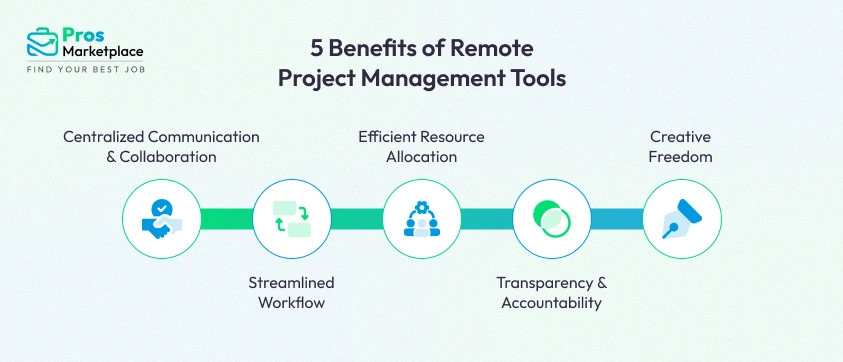
5 Major Benefits of Remote Project Management Tools
Using these platforms transforms not just how remote job gets done, but how creativity unfolds. Here’s what distinguishes remote creative project management tools:
Centralized Communication & Collaboration
Remote project management tools help teams ditch endless email threads and scattered chat apps by offering unified platforms for messaging, commenting, and creative feedback. In fact, teams using software with inbuilt communication features report a 52% improvement in team communication, leading to greater transparency and project alignment.
Streamlined Workflow
Automated dashboards, Kanban boards, and timeline tools help teams visualize every stage of a creative project, assign tasks, and track status—all in real-time. High-performing teams using robust project management software waste 28 times less money thanks to better coordination and reduced rework, according to the Project Management Institute.
Efficient Resource Allocation
AI-powered resource forecasting in top tools allows leaders to allocate designers, writers, and strategists based on actual workload and skills, minimizing idle time. With smarter allocation, companies reduce staff burnout and meet deadlines more consistently—a direct boost to efficiency and morale.
Transparency & Accountability
When everyone can see who’s doing what, progress becomes part of the culture. Visual dashboards and activity logs not only clarify responsibilities but also keep creative projects moving. Research shows that teams using project management tools save the average employee 498 hours per year by being able to find files, notes, and status updates instantly.
Creative Freedom
Asset libraries, version control, and collaborative spaces empower remote creatives to experiment and refine their work securely. Features like real-time editing and proofing tools support agile feedback cycles and rapid iteration, leading to higher quality outcomes. 44% of organizations report that project management tools directly improve the quality of the final product—and 38% say they increase customer satisfaction.
Factors to Consider While Choosing the Best Project Management Software
Choosing the right project management tool isn’t a one-size-fits-all decision. The tool must align with your team’s unique workflow, budget, and culture. Start by clearly defining your project scope—the breadth and boundaries of your creative work—to ensure the software can accommodate all required deliverables and stakeholders. Here’s a checklist for evaluating potential platforms to avoid common pitfalls and find the perfect fit.
- Collaboration Features: Does it offer real-time comments, file sharing, and feedback channels tailored for creativity?
- Ease of Use: Will your artists, designers, and copywriters feel at home—or get lost in tech jargon?
- Resource Management: Can you efficiently allocate talent, track workload, and prevent burnout?
- Integration Capability: Does it play nicely with other platforms your team already uses (Slack, Figma, Notion, Zoom, Trello)?
- Customization: Can you tailor workflows, boards, or dashboards to your unique creative process?
- Security: Are sensitive creative assets protected with robust permissions and encryption?
- Client Access & Approval: Can you share work-in-progress and receive direct feedback from clients or stakeholders?
- Scalability: Will this tool support your growth—from boutique agency to global creative collective?
12 Best Remote Creative Project Management Tools: Cost & Features
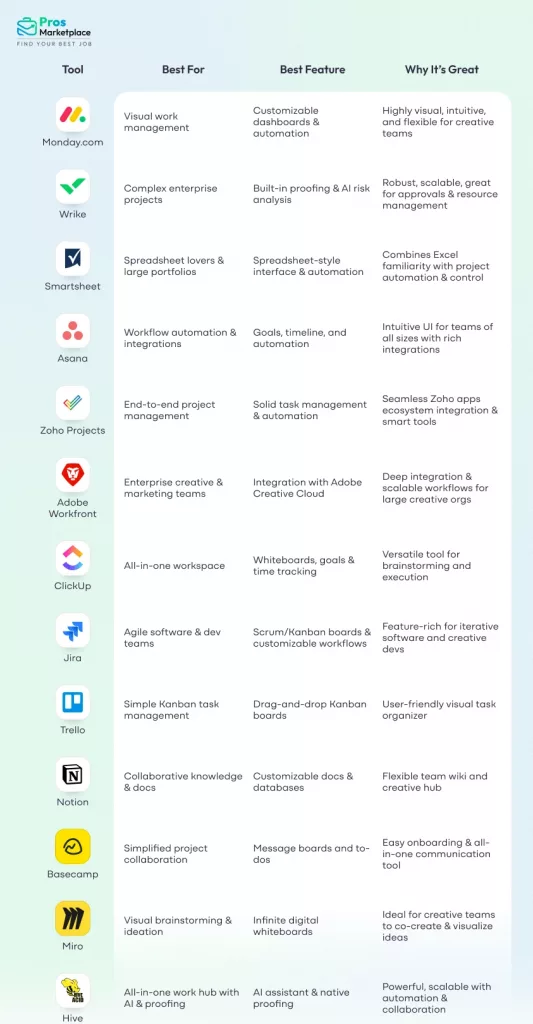
Managing creative projects remotely demands tools that not only organize tasks but also foster collaboration, creativity, and productivity. Here’s a deep dive into 12 of the best project management tools, highlighting their key features, pricing, and unique aspects that make them stand out for remote creative teams.
Monday.com
Monday.com combines vibrant, customizable workflows with powerful automation to help creative teams manage design project effortlessly. Its visual dashboards, timeline views, and integrations build a seamless workspace to track tasks from ideation to completion. The platform’s user-friendly interface is especially suited for teams that crave flexibility without sacrificing structure.
Key Features:
- Customizable dashboards and boards
- Timeline and Gantt chart views
- Automation of repetitive tasks
- Time tracking and workload management
- Extensive app integrations
Key Integrations:
- Slack: Real-time updates and task notifications inside Slack channels
- Microsoft Teams: Embed Monday.com boards and communicate in one platform
- Zoom: Schedule and launch meetings directly from boards
- Google Drive: Attach and manage files from Google Drive within projects
- Outlook & Gmail: Convert emails into actionable tasks
- Figma & Canva: Link design assets directly to project tasks
- Salesforce: Sync sales pipeline and project tasks
- Zapier & Integromat: Automate workflows by connecting with numerous apps
Pricing:
- Free: for 2 users
- Basic: $9/user/month
- Standard: $12/user/month
- Pro: $19/user/month
- Enterprise: pricing on request
Wrike
Wrike excels at supporting complex workflows through a variety of views—Kanban, Gantt, and real-time dashboards—making it perfect for creative projects needing tight coordination and fast approvals. With proofing tools and AI-powered risk analysis, Wrike helps keep design project on track with high transparency and collaboration.
Key Features:
- Multiple project views (Gantt, Kanban, Table)
- Built-in proofing and approval system
- AI-driven risk and workload management
- Custom request forms for creative briefs
- Robust integrations with design and communication tools
Key Integrations:
- Slack & Microsoft Teams: Real-time collaboration and task updates within chat
- Adobe Creative Cloud: Direct access and proofing of design files
- Google Drive & Dropbox: File sharing and cloud storage integration
- Salesforce: Sync customer data with project updates
- Zoom: Schedule and manage video meetings
- Jira: Link and coordinate dev projects with creative workflows
Pricing:
- Free Plan: Unlimited Users;
- Team: $9.80/user/month;
- Business: $24.80/user/month;
- Enterprise: Custom pricing
Smartsheet
Smartsheet offers an Excel-like interface combined with advanced project management features. It supports automation, resource management, and real-time reporting, making it an excellent choice for creative teams handling multiple complex projects. Its Control Center feature helps standardize processes across portfolios.
Key Features:
- Spreadsheet-based task and project management
- Workflow automation and alerts
- Resource allocation and tracking
- Project baselines and portfolio Control Center
- Real-time dashboards and reporting
Key Integrations:
- Microsoft Teams & Slack: Seamless messaging and notifications
- Google Workspace: Sync files and calendar events
- Salesforce: Align sales and project management
- Dropbox & Box: File storage and sharing
- Jira: Integrate dev task tracking
- Power BI: Advanced reporting and analytics
Pricing:
- Free: 1 user, 2 editors
- Pro: $7/user/month
- Business: $25/user/month
- Enterprize: Custom pricing
Asana
Smartsheet offers an Excel-like interface combined with advanced project management features. It supports automation, resource management, and real-time reporting, making it an excellent choice for creative teams handling multiple complex projects. Its Control Center feature helps standardize processes across portfolios.
Key Features:
- Spreadsheet-based task and project management
- Workflow automation and alerts
- Resource allocation and tracking
- Project baselines and portfolio Control Center
- Real-time dashboards and reporting
Key Integrations:
- Slack & Microsoft Teams: Task notifications and commenting
- Google Drive & Dropbox: File attachments and collaboration
- Zoom: Video meetings linked to tasks
- Figma: Embed live design prototypes
- Salesforce: Sync CRM data and tasks
Pricing:
- Free: Up to 15 users
- Premium: $10.99/user/month
- Business: $24.5/user/month
- Enterprize: Custom pricing
Zoho Project
Zoho Project is a flexible, feature-rich project management tool designed to help remote creative teams streamline workflows without complexity. It offers excellent task management, collaboration, and automation features that allow teams of all sizes to plan, track, and deliver creative projects efficiently. Its seamless integration with the wider Zoho ecosystem makes it an ideal choice for businesses using Zoho’s CRM and other apps.
Key Features:
- Task management with dependencies and milestones
- Kanban boards for visual workflow
- Time tracking and billing integration
- Automated workflows and notifications
- Detailed reporting and analytics
Key Integrations:
- Zoho Apps: Zoho CRM, Zoho People, Zoho Expense, Zoho Mail
- Google Workspace: Drive, Calendar, Gmail integration
- Dropbox & Box: Cloud storage and file sharing
- Microsoft Teams & Slack: Messaging and notifications
- Zoho Flow: Connects to 1000+ apps for automated workflows
- Zapier: Workflow automation connecting various apps
- Google Calendar & Teamup: Automated event scheduling from tasks/project timeline
Pricing:
- Free: for 3 users, 2 projects
- Premium: $5/users/month
- Enterprise: $9/user/month
Adobe Workfront
Adobe Workfront is an enterprise-grade work management platform engineered for dynamic creative teams seeking robust resource planning, campaign orchestration, and seamless collaboration. Fully integrated with Adobe Creative Cloud, Workfront eliminates silos by connecting creative workflows, requests, approvals, and asset management in a unified system. With customizable dashboards, real-time tracking, and powerful automation, it’s designed for agencies and enterprises needing visibility, control, and speed at scale.
Key Features:
- Streamlined campaign planning and brief creation
- Customizable workflows with automation and templates
- Centralized project and resource management
- Integrated proofing and multi-stage approval flows
- Advanced analytics and visual dashboards
Key Integrations:
- Adobe Creative Cloud (Photoshop, InDesign, XD, Illustrator, Premiere Pro, After Effects): Manage assignments, feedback, and time inside creative tools
- Slack & Microsoft Teams: Collaborative updates and messaging
- Salesforce & Workday: Connect project records to client/customer databases
- Google Drive, Dropbox, Box: File storage, sharing, and asset management
- Frame.io: Streamlined video review and collaboration tool
- Zapier, Workfront Fusion: Connect with hundreds of industry apps for workflow automations
Pricing:
Custom enterprise pricing; contact Adobe for a tailored quote
ClipUp
ClickUp provides an all-encompassing workspace blending task management, whiteboards, mind maps, goal tracking, and docs. Its modular design makes it adaptable for creative problem solving, brainstorming, and execution within one app, reducing tool fatigue among remote teams.
Key Features:
- Whiteboards and mind mapping
- Time tracking and goal setting
- Customizable dashboards
- Docs and wiki functionality
- Workflow automation and integrations
Key Integrations:
- Slack & Microsoft Teams: Instant messaging updates and alerts
- Google Drive & Dropbox: Document sharing and editing
- Zoom: Meeting scheduling from tasks
- GitHub & GitLab: Developer collaboration integration
- Figma: Collaborate on design assets
Pricing:
- Free: Unlimited users & tasks
- Unlimited: $7/user/month
- Business: $12/user/month
- Enterprise: Custom
Jira
Jira is the agile project management powerhouse ideal for development-focused creative teams. It offers Scrum and Kanban boards, custom workflows, and detailed progress tracking. Its extensive ecosystem supports integration with code repositories, design tools, and reporting add-ons.
Key Features:
- Scrum and Kanban boards
- Customizable workflows and issue tracking
- Detailed reporting and analytics
- Integration with development and design tools
- Strong security and compliance
Key Integrations:
- Confluence: Documentation linked with issue tracking
- Bitbucket & GitHub: Dev and task coordination
- Slack & Microsoft Teams: Notifications and chats
- Trello: Task and board synchronization
- Zendesk: Customer ticket tracking
Pricing:
- Free: for up to 10 users
- Standard: $8.15/user/month
- Premium: $16.15/user/month
- Enterprise: Custom pricing
Trello
Trello’s visual Kanban boards make project tracking intuitive and accessible. Creatives love the simplicity of drag-and-drop cards for task management, checklist creation, and collaborative commenting. Its expandable nature through Power-Ups allows users to tailor Trello to their creative workflow.
Key Features:
- Intuitive Kanban boards
- Card-based task organization
- Checklists and reminders
- Integration Power-Ups
- Mobile-friendly interface
Key Integrations:
- Slack & Microsoft Teams: Real-time board updates in chat
- Google Drive & Dropbox: Attach files directly to cards
- Evernote: Notes integration
- GitHub & Jira: Development workflow tracking
- Salesforce: Sync customer and project data
Pricing:
- Free: Unlimited cards
- Standard: $5/user/month
- Premium: $10/user/month
- Enterprise: starts with $17.50/user/month
Notion
Notion is a flexible all-in-one workspace for notes, docs, projects, and knowledge sharing. It’s ideal for creative teams needing a collaborative brain where creative briefs, asset libraries, and project documentation live together and evolve organically.
Key Features:
- Collaborative docs and wikis
- Databases and tables
- Templates library
- Real-time collaboration
- Integrations with Slack, Google Drive, and more
Key Integrations:
- Slack: Notifications and task updates
- Google Drive: Embed and manage files
- Figma: Embed design prototypes
- GitHub: Code snippets and documentation
- Zapier: Workflow automation
Pricing:
- Free: for personal use
- Team: $8/user/month
- Enterprise: $20/user/month
Basecamp
Basecamp is an all-around collaboration suite focusing on simplicity. It bundles messaging boards, schedules, to-dos, file sharing, and real-time chat into a single platform. Its flat-rate pricing makes it cost-effective for mid-size creative teams looking for an easy onboarding experience.
Key Features:
- Message boards and group chat (Campfire)
- To-do lists and schedules
- File sharing and document storage
- Automatic check-ins to keep teams aligned
- Simple task and project templates
Key Integrations:
- Slack: Integrate chat updates
- Google Drive / Dropbox: File storage and sharing
- Zapier: Automate repetitive workflows
Pricing:
- Base Plan: $15/user/month
- Pro Unlimited: $349/month
Miro
Miro offers a dynamic digital whiteboard experience enabling brainstorming, flowcharting, mind mapping, and collaborative ideation in real time. It’s perfect for driving creativity, whether design team are sketching early ideas or visualizing complex workflows.
Key Features:
- Infinite digital whiteboards
- Pre-built templates and sticky notes
- Kanban and mind mapping tools
- Video chat and screen sharing integrations
- Real-time and asynchronous collaboration
Hive
Hive is a powerful, intuitive project management and collaboration platform designed to help fast-moving creative teams hit deadlines while staying connected. With flexible views like Kanban, Gantt, and calendar, combined with AI-powered tools and rich integrations, Hive adapts perfectly to various creative workflows. Its lightweight interface balances feature-rich capabilities with ease of use, making it a favorite for teams scaling up remote operations.
Key Features:
- Multiple project views: Kanban, Gantt, calendar, timeline
- AI assistant for automation and innovative suggestions
- Native chat, email integration, and video conferencing (Zoom, Slack)
- Time tracking and comprehensive reporting
- Customizable workflows with shareable forms and portfolio management
Key Integrations:
- Slack, Microsoft Teams: real-time communication
- Gmail: email integration with task creation
- Dropbox, Google Drive: file storage and sharing
- Salesforce: data syncing for goal tracking
- Zapier: workflow automation
Pricing:
- Free: for up to 10 users
- Starter: $5/user
- Teams: $12/user
- Enterprise: Custom pricing
7 Future Trends In Remote Creative Project Management
As we venture further into 2025 and beyond, the landscape of remote creative project management is evolving at an exhilarating pace. Here are the key trends shaping how future-forward teams will collaborate, create, and conquer challenges in remote settings:
1. AI and Automation as Everyday Helpers
Artificial Intelligence is no longer a futuristic dream but an everyday teammate for project managers. AI-driven tools are automating routine tasks like scheduling, progress tracking, and risk assessment, allowing creatives to focus on ideation and execution. Expect smarter virtual assistants that not only organize multiple projects but also predict bottlenecks and suggest creative solutions before problems arise—supercharging productivity effortlessly.
Example: Monday.com uses AI-powered automation to assign tasks, send reminders, and predict project risks. Adobe’s Creative Cloud integration leverages AI (Adobe Sensei) to speed up repetitive tasks like image editing, freeing creative teams to focus on conceptualization.
2. Hybrid and Agile Methodologies Dominate
Gone are the days when a single project management approach fits all. Agile methodologies, combined with traditional waterfall elements, create hybrid workflows tailored to creative complexity and remote team dynamics. This versatility enables teams to pivot quickly while maintaining structured deliverables, enhancing speed without sacrificing quality.
Example: Spotify famously uses a “Squad” model blending Agile and traditional project management, empowering small, autonomous teams to innovate rapidly. Creative agencies like R/GA adopt hybrid workflows to balance creative discovery with tight client deadlines.
3. Integration of Emotional Intelligence and Human-Centric Leadership
As remote teams grow globally distributed, leaders are prioritizing emotional intelligence to nurture trust, empathy, and clear communication. New project management tools are embedding features that promote wellbeing check-ins, pulse surveys, and transparent feedback loops—making remote culture vibrant and connected, not isolated.
Example: Buffer, a fully remote company, places wellbeing check-ins at their core, using tools like CultureAmp integrated with project software to capture team sentiment regularly and take action on remote work stress or engagement levels.
4. Expansion of Data-Driven Decision Making
The future favors creative project managers who wield data like a creative asset. Integrated analytics dashboards and real-time reporting will become standard, offering granular visibility into resource allocation, team performance, and project risks. Data will guide decisions, forecast trends, and align creative vision with business outcomes more precisely than ever.
Example: Wrike’s real-time dashboards provide executives at companies like Google with granular analytics on project performance, resource usage, and timelines, enabling proactive decision-making in large-scale creative campaigns.
5. Enhanced Cybersecurity and Compliance Focus
With remote work proliferating, remote project managers must navigate complex cybersecurity and data privacy landscapes. Future project management platforms will embed advanced security measures like zero-trust access, GDPR compliance, and encrypted collaboration to safeguard creative assets—ensuring peace of mind alongside productivity.
Example: Financial services giant JPMorgan Chase uses enterprise-level project management (including tools like Jira and Basecamp) with strict zero-trust cybersecurity protocols and regulatory compliance to protect sensitive creative content and internal collaboration.
6. Sustainability and Social Responsibility
Sustainability won’t be an afterthought but a core project consideration. Creative project manager are increasingly tasked with aligning workflows to environmental and social governance goals. Remote work itself supports this trend by reducing commuting emissions and enabling inclusive hiring, making sustainability a natural fit for next-gen creative project management tool.
Example: Patagonia’s remote creative teams utilize cloud-native project tools to reduce office commuting, aligning workflow processes with their environmental activism mission. This approach minimizes carbon footprint while promoting an inclusive, global creative workforce.
7. Rise of Cloud-Native and Decentralized Tools
Cloud-first project management platforms designed for seamless global access will dominate, leveraging blockchain and decentralized technologies to empower autonomous teams. This shift will reduce reliance on centralized servers, enhance transparency, and support more creative freedom with governance embedded in the software itself.
Example: GitLab is a pioneer fully remote platform built on a decentralized cloud architecture, enabling its global creative and development teams to collaborate transparently and autonomously without centralized office infrastructure.
Conclusion
In the dynamic realm of remote creative project management, the perfect tool is the one that not only organizes tasks but breathes life into your team’s vision. Whether you crave Monday.com’s vibrant dashboards, Jira’s agile mastery, or Miro’s boundless canvas for collaboration, each platform brings unique strengths tailored to different creative journeys. The best project management tool seamlessly fits your team’s workflow, scales with your ambitions, and sparks innovation wherever your creatives are.
So, are you ready to transform chaos into creativity and elevate your remote projects to new heights? Dive in, explore, hire project managers or choose us as your powerhouse project planning partner today!